


































Every detail, dollar, & decision
together at last
If your projects feel all over the place, it usually means you're the one holding them together. Put it all in Materio. We'll hold it together, so you don't have to.
Every detail, dollar, & decision
together at last
If your projects feel all over the place, it usually means you're the one holding them together. Put it all in Materio. We'll hold it together, so you don't have to.
Every detail, dollar,
& decision
together at last
If your projects feel all over the place, it usually means you're the one holding them together. Put it all in Materio. We'll hold it together, so you don't have to.
Trusted by 1,500+ top design & build professionals. Recognized industry-wide.



Four phases. One workflow.
Four phases. One workflow.
Four phases.
One workflow.
From planning to closeout, every decision feeds the next step, keeping your projects moving, your clients informed, and your team in full control.
From planning to closeout, every decision feeds the next step,
keeping your projects moving, your clients informed, and your team in full control.
From planning to closeout, every decision feeds the next step. Keeping your projects moving, your clients informed, and your team in full control.
01.PLANNING PHASE
Lay the foundation for a smooth project
Lay the foundation for a smooth project
Lay the foundation for a smooth project
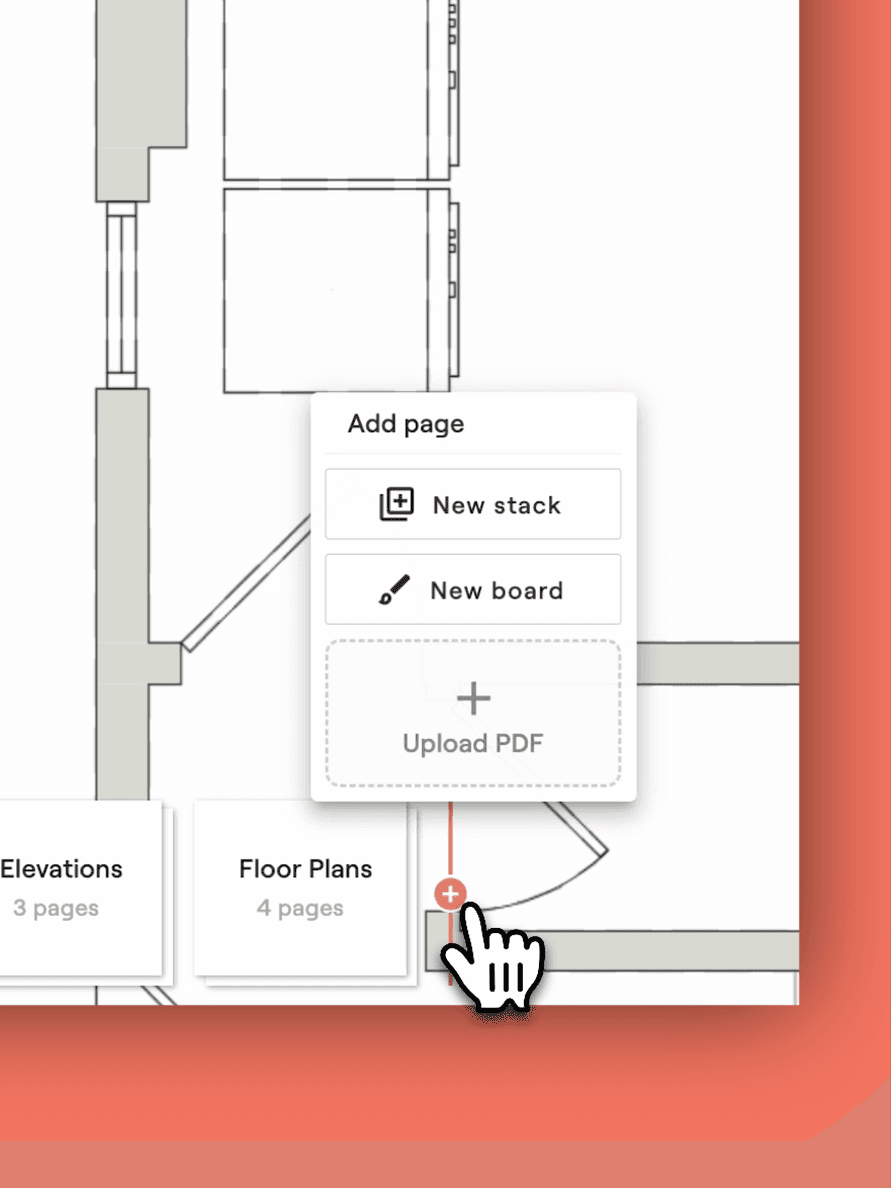
Upload project visuals
Bring in floor plans and elevations so everyone works from the same source of truth.
Bring in floor plans and elevations so everyone works from the same source of truth.
Map selections to floor plan
Map selections
Place markers where items go to create scope items and give your team, clients, and installers a clear visual reference—so everyone sees exactly what goes where.
Place markers where items go to create scope items and give your team, clients, and installers a clear visual reference.
Place markers where items go to create scope items and give your team, clients, and installers a clear visual reference—so everyone sees exactly what goes where.
Build your scope
As you map, your scope builds itself, replacing the spreadsheets, docs, and email chains that slow projects down.
As you map, your scope builds itself, replacing the spreadsheets, docs, and email chains that slow projects down.
Set item budgets
Enter quick estimates that roll into a live budget you can refine later—keeping projects on track from the start.
Enter quick estimates that roll into a live budget you can refine later—keeping projects on track from the start.
02.DESIGN PHASE
Turn scope items into beautiful, client-ready concepts.
Turn scope items into beautiful, client-ready concepts.
Turn scope items into beautiful, client-ready concepts.
Pull options
Pull options from your design library. Use the Materio Selections Clipper to build it fast and keep everything in one place.
Pull options from your design library. Use the Materio Selections Clipper to build it fast and keep everything in one place.
Build a concept board
Combine selections and inspiration images into a vision board your client can instantly understand and react to.
Combine selections and inspiration images into a vision board your client can instantly understand and react to.
Present designs
Turn concepts into detailed proposals with quantities, pricing, and specs. Your scope flows right in, so nothing gets missed.
Turn concepts into detailed proposals with quantities, pricing, and specs. Your scope flows right in, so nothing gets missed.
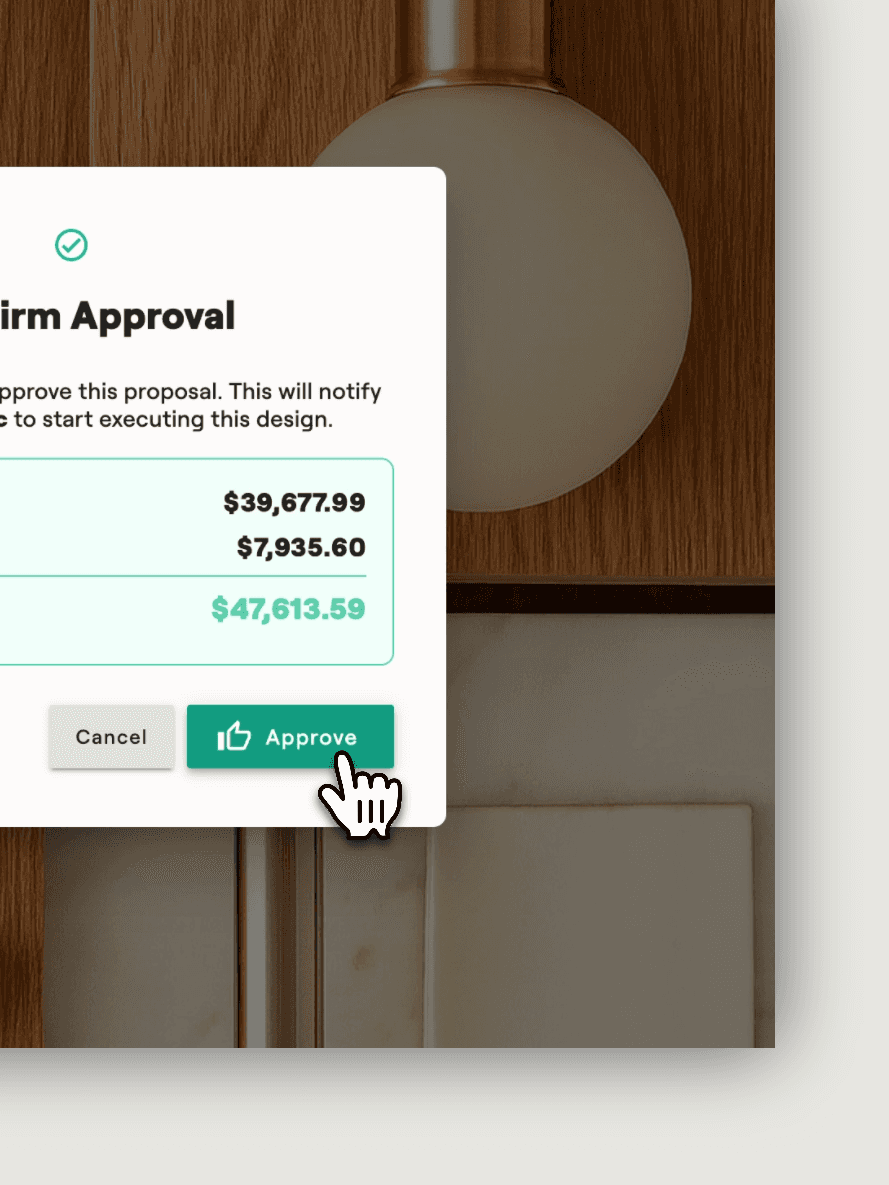
Get client sign-off
Give clients a clear, visual proposal to sign off on, so decisions stick and the project keeps moving.
Give clients a clear, visual proposal to sign off on, so decisions stick and the project keeps moving.
03.PROCUREMENT PHASE
03.PROCUREMENT PHASE
Turn approved designs into orders and track them all the way to the job site.
Turn approved designs into orders and track them all the way to the job site.
Turn approved designs into orders and track them all the way to the job site.
Auto-draft purchase orders
Once scope items are approved, POs draft themselves, giving you accuracy with zero rework.
Once scope items are approved, POs draft themselves, giving you accuracy with zero rework.
Send and track purchase orders
After review, Materio generates a PDF and drafts an email to the vendor. Just review and click send. No typing, no formatting, only forward momentum.
After review, Materio generates a PDF and drafts an email to the vendor. Just review and click send. No typing, no formatting, only forward momentum.
Track shipments
Materio logs lead times, tracking numbers, and delivery status.
Materio logs lead times, tracking numbers, and delivery status.
Performance updated in real-time
Actual costs sync automatically, keeping budget vs. estimate in check.
Actual costs sync automatically, keeping budget vs. estimate in check.
04.INSTALLATION & CLOSEOUT PHASE
04.INSTALLATION & CLOSEOUT PHASE
Keep the install smooth and wrap the project with zero loose ends.
Keep the install smooth and wrap the project with zero loose ends.
Keep the install smooth and wrap the project with zero loose ends.
Download a full schedule
Export a complete finish schedule with all items, vendors, and delivery details. Share it with your contractor or build team so everyone knows what’s arriving and what gets installed where.
Export a complete finish schedule with all items, vendors, and delivery details. Share it with your contractor or build team so everyone knows what’s arriving and what gets installed where.
Provide on-site access
QR codes link trades directly to item details, with install instructions or reference docs attached so they have everything needed for a smooth install.
QR codes link trades directly to item details, with install instructions or reference docs attached so they have everything needed for a smooth install.
Confirm install completion
Mark items complete with notes once installed.
Mark items complete with notes once installed.
Project closeout
Archive all project details, docs, finances and approvals in one place for easy reference and peace of mind.
Archive all project details, docs, finances and approvals in one place for easy reference and peace of mind.
Customer Stories
The new standard for design teams
How leading design and build teams are bringing clients, projects, vendors
and contractors into one workflow
"We were spending, it felt like all of our time, kind of managing the status. What's been ordered? What hasn't been ordered? When has this shipped? And we were chasing our tails."
Monica Guarnaschelli
Founder, Indigo Maven Interiors · Louisville, KY
"The client wrote back and said, 'I am so impressed by the technology you use, here's the signed contract.' It's paid for itself already."
Emily Campbell
Principal Designer and Owner, Emily Jean Interior Design · Vancouver, WA
"We just live off it... I don't know what to say. We don't use anything else. It's like the central point of our business."
Miah Millan
Principal Designer and Owner, Miah Millan Interiors · Little Rock, AR
Customer Stories
The new standard for design teams
How leading design and build teams are bringing clients, projects, vendors
and contractors into one workflow
"We were spending, it felt like all of our time, kind of managing the status. What's been ordered? What hasn't been ordered? When has this shipped? And we were chasing our tails."
Monica Guarnaschelli
Founder, Indigo Maven Interiors · Louisville, KY
"I don't feel like, oh, this would work for a couple years and then I might have to look elsewhere. It really does feel like it is set up to grow with my company."
Alana Spears
Principal Designer and Owner, Alana Spears Home · Portland, OR
"The client wrote back and said, 'I am so impressed by the technology you use, here's the signed contract.' It's paid for itself already."
Emily Campbell
Principal Designer and Owner, Emily Jean Interior Design · Vancouver, WA
"We just live off it... I don't know what to say. We don't use anything else. It's like the central point of our business."
Miah Millan
Principal Designer and Owner, Miah Millan Interiors · Little Rock, AR
Customer Stories
The new standard for
design teams
How leading design and build teams are bringing clients, projects, vendors
and contractors into one workflow
"We were spending, it felt like all of our time, kind of managing the status. What's been ordered? What hasn't been ordered? When has this shipped? And we were chasing our tails."
Monica Guarnaschelli
Founder, Indigo Maven Interiors · Louisville, KY
"The client wrote back and said, 'I am so impressed by the technology you use, here's the signed contract.' It's paid for itself already."
Emily Campbell
Principal Designer and Owner, Emily Jean Interior Design · Vancouver, WA
"We just live off it... I don't know what to say. We don't use anything else. It's like the central point of our business."
Miah Millan
Principal Designer and Owner, Miah Millan Interiors · Little Rock, AR

Ready to transform chaos into confidence?
Ready to transform chaos into confidence?
Start with your next project. No credit card required.
Start with your next project.
No credit card required.
From overwhelmed to in control in less than an hour—start your transformation today.